
Welcome Email Sequence Examples: Three Useful Emails
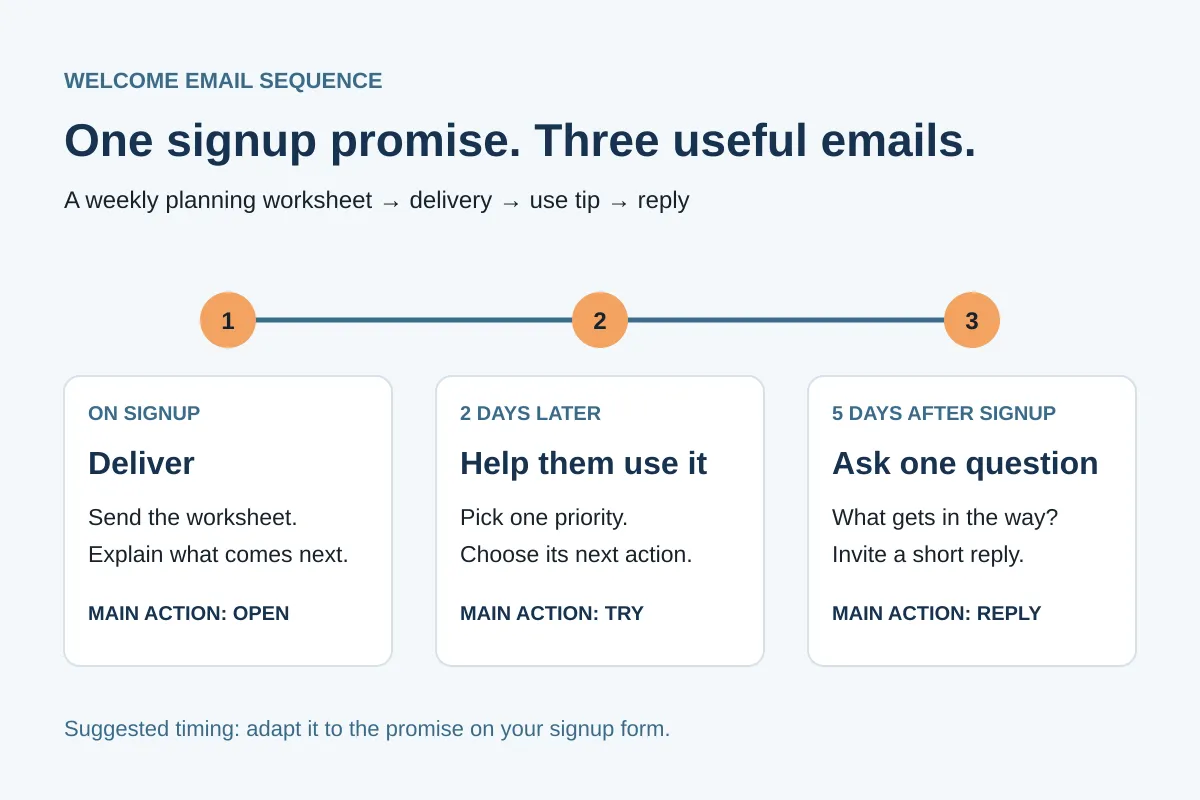
A simple welcome email sequence delivers what someone signed up for, helps them use it, then offers one clear next step. These welcome email sequence examples use three messages: a welcome with the promised resource, a practical tip, and a focused question. Send the first when the subscription is ready to receive welcome messages; space the others to fit the promise on your signup form.
What should a three-email welcome sequence include?
A welcome email sequence is a short series of messages sent to introduce new subscribers to a business or newsletter. Each message should do a different job while staying connected to the reason the reader joined.
| Message | Job | Main action | Suggested timing |
|---|---|---|---|
| 1. Welcome | Deliver the promised resource and explain what follows | Open the resource | On signup, after any required confirmation |
| 2. Use tip | Show one specific way to use the resource | Try the step | Two days after the first email |
| 3. Question | Learn what the subscriber needs next | Reply to one question | Five days after the first email |
This timing is a starting plan, not a performance benchmark. A daily course needs a different pace from a monthly newsletter. If the signup form promises a download only, don't quietly turn it into ongoing marketing; make sure your sending plan matches what subscribers agreed to receive.
Write the signup promise before writing the emails
Say a small business called Alder Week shares a free one-page weekly planning worksheet. Its signup form says: “Get the worksheet, three getting-started emails, then one planning tip each month.” The worksheet has three sections: this week's priority, the next action, and a calendar slot. Rowan runs the business and checks the reply inbox.
That brief gives the sequence its boundaries:
- Deliver: the free worksheet, with no invented discount or deadline.
- Teach: how to fill in the priority and next-action sections.
- Ask: what makes weekly planning difficult.
- Continue: one planning tip each month, as the form promised.
Before adapting the messages below, write your own version of those four lines. Use facts you can check on your signup form and destination page. The bracketed fields are places for your actual link, sender details and reply address.
Email 1: Deliver the resource and set expectations
The first welcome email should make the promised item easy to find. Keep a long business story or several unrelated offers out of the path to that item.
Subject: Your weekly planning worksheet is here
Preview text: Start with one priority for the week ahead.
Hi there,
Thanks for joining Alder Week. Here's the free weekly planning worksheet you requested:
Open your worksheet: [worksheet URL]
It has space for this week's priority, one next action, and a calendar slot for that action. You can print it or work from it on screen.
Over the next five days, I'll send a getting-started tip and one question about your planning routine. After that, you'll receive one planning tip each month.
Rowan at Alder Week
You can reach me at [monitored reply address].
The main action is opening the worksheet. The expectation-setting paragraph matches the signup promise instead of adding a surprise sales series. Keep the printing and on-screen sentence only if both are true for your resource.
Email 2: Teach one step they can try now
The second email should add something useful even if the subscriber already opened the first. Choose one concrete instruction rather than sending “just checking in” with the same download link.
Subject: Put one next action on your weekly plan
Preview text: Make the priority specific enough to start.
Hi there,
When you open your Alder Week worksheet, start with one priority for this week. Then write the next action that would move it forward.
For example, “sort out the website” is broad. “List the three pages that need new copy” is an action you can put on your calendar.
Add a calendar slot for that action in the worksheet's final section. Leave the rest of the plan alone until you've chosen that first step.
Open the worksheet: [worksheet URL]
Rowan at Alder Week
The main action is trying the planning step; the worksheet link supports it. You don't need to assume that the reader downloaded or completed anything. “When you open” works without claiming to know their behavior.
Email 3: Ask a question someone can answer quickly
The third message can invite a reply when you have a monitored inbox and a reason to read the answers. Ask one question with a narrow scope; don't ask for a life story, survey completion and purchase in the same email.
Subject: What gets in the way of your weekly plan?
Preview text: One sentence is enough.
Hi there,
What usually gets in the way when you plan your week: choosing a priority, deciding the next action, or finding time for it?
Hit reply and tell me which part is hardest. One sentence is enough. I read replies to understand which planning topics would be useful in future tips.
This is the last getting-started email. From here, I'll send one planning tip each month.
Rowan at Alder Week
Here, replying is the main action, so there's no need for another promotional link. Keep “I read replies” only if someone actually does. If your signup promise includes product updates and your next step is a purchase, replace this message with a specific, available offer and its relevant conditions—not an invented countdown.
Adapt the sequence without adding unsupported promises
Kit's guide to welcome emails identifies useful building blocks such as a reminder of why someone joined, expectation setting and a question for subscribers. You don't need every block in every message. Choose the ones that help the reader do that email's job.
- Checklist subscribers: deliver the checklist with access instructions, teach one item they can apply, then ask which part of the task is hardest.
- Newsletter subscribers: deliver the promised edition or a clearly described introduction, share a useful idea from its topic, then ask what they'd like covered.
- Product-guide subscribers who agreed to product updates: deliver the guide, explain a supported product use case, then link to one relevant product page with accurate availability and conditions.
Keep the signup reason consistent across the form, subject line, email body and destination. If someone joined for a guide, deliver the guide before asking them to book a call.
Check the whole sequence before switching it on
Review the sequence in the email platform that will actually send it:
- Test the entry point. Use your own test address to complete the intended signup and any confirmation step. Check that the first message arrives once, not once from this sequence and again from an older welcome automation.
- Replace every unfinished field. Search for square brackets. Open each destination and confirm that it delivers what the email promises, including any access step.
- Configure the sender and footer. Set a recognizable From name and monitored Reply-To address. Add your provider's working unsubscribe footer and required business details; a typed draft doesn't configure those settings.
- Send all three as tests. Read them on phone and desktop. Check subjects, preview text, spacing and links, then reply to the question email and confirm that the reply reaches the right inbox.
- Review the end of the automation. Apply unsubscribe and other suppression rules throughout the sequence. Confirm how subscribers move to your regular newsletter so they don't receive overlapping messages or a different frequency from the one promised.
Three emails are enough when they've delivered the promise, taught a useful step and made the next action clear. Add another only when it has a separate job the subscriber expects.
Draft the first message, then build the sequence around it
Ai Master Deals offers a free first-welcome-email drafter for beginner small-business marketers: add a checked brief, edit the fixed-template text and copy it locally, with no email or account needed. It drafts only the first message and doesn't verify facts or send email. For an offline reference, the free welcome-email PDF and first-email DOCX starter provide a three-page sequence reference and a two-page editable first-message starter after explained email access.